Bumble Filters Explained: How To Get More Dates


What Bumble Filters Do
Stop swiping on people you'd never actually date.
Bumble's filter system lets you screen for the traits that genuinely matter to you, like age, distance, lifestyle habits, relationship goals, and more. This makes your match queue is full of people worth your time, not just whoever's nearby. Basic filters are free for everyone; unlocking the full suite requires a Premium subscription.
Table of contents
What Bumble Filters Do
Stop swiping on people you'd never actually date.
Bumble's filter system lets you screen for the traits that genuinely matter to you, like age, distance, lifestyle habits, relationship goals, and more. This makes your match queue is full of people worth your time, not just whoever's nearby. Basic filters are free for everyone; unlocking the full suite requires a Premium subscription.
Key Takeaways:
- Two filter tiers exist: Basic filters (free for all users) cover gender, age, distance, language, and verified profiles. Advanced filters add height, relationship intentions, religion, politics, family plans, education, exercise habits, smoking, drinking, and star sign.
- Advanced filters are gated by subscription. You can use a limited number of Advanced filters for free; unlimited Advanced filters require Bumble Premium or Bumble Boost.
- You can only filter by what you've filled out yourself. If you haven't listed your political views on your profile, you can't filter for them in matches.
- Your filter answers appear on your profile. Applying a filter means revealing that answer about yourself — keep that in mind before filtering by height or other personal details.
- Each Bumble mode has separate filter settings. Date, BFF, and Bizz each let you configure filters independently.
- Over-filtering shrinks your match pool. Bumble will notify you when your filters are too narrow — even in large cities. Save filters for genuine deal breakers.
- Premium subscriptions unlock more than just filters. BeeLine, Incognito Mode, Travel Mode, Rematch, and unlimited swipes are also part of the Premium and Boost packages.
How Bumble Filters Work
Bumble's filtering system is divided into two levels: Basic and Advanced.
Basic filters are available to all users at no cost. They let you narrow your match pool by:
- Gender
- Age range
- Distance
- Languages spoken
- Verified profile status
Advanced filters go significantly deeper, letting you screen for:
- Height
- Relationship intentions (casual, long-term, etc.)
- Family plans
- Whether they have or want kids
- Religious identity
- Education level
- Political views
- Exercise habits
- Smoking habits
- Drinking habits
- Star sign
According to Bumble's own support documentation, Advanced filters are part of Bumble Premium, and Premium subscribers can apply an unlimited number of them.
The Catch: Your Profile Has to Match
Here's the rule that trips people up most: you can only filter by a category if you've answered that question on your own profile. If you haven't specified your stance on drinking, for example, you can't filter your matches by theirs.
This also means your filter answers show up on your profile. If you're filtering for someone at least 5'6" but don't want anyone to know you're 5'7", don't apply the height filter — your height becomes visible the moment you do.
How to Set Bumble Filters (Step by Step)
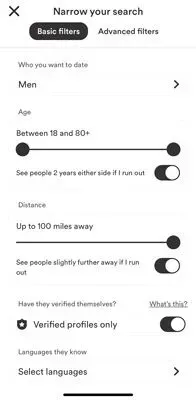
Setting up filters takes about 30 seconds:
- Open Bumble and go to your match feed (the "People" tab)
- Tap the filter icon in the upper right corner
- Select Basic or Advanced filters
- Use the toggles or tap "Add this filter" to open the options
- Select your preferred criteria
- Repeat for each filter you want to apply
For Advanced filters specifically: go to the Advanced Filters tab, tap "Set advanced filters," and choose from the available categories. Remember, only categories you've filled out on your own profile will be available to select.
Each Bumble Mode — Date, BFF, and Bizz — has its own independent filter settings, so you can configure them separately without one affecting the others.
How to Use Filters Without Sabotaging Your Match Count
Filters are most useful when used with intention. Here's how to get the most out of them:
Reserve filters for actual deal breakers
If you genuinely won't date someone who smokes or wants kids when you don't, those are worth filtering for. But if you're applying height requirements, star sign preferences, and education filters simultaneously, you're probably cutting out a lot of compatible people unnecessarily.
Watch for the "expand filters" notification
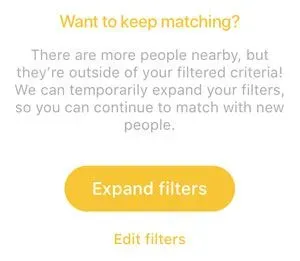
If Bumble shows a prompt to expand your search. even in a city like New York or Los Angeles with a large user base, treat it as a signal that you've filtered too aggressively. Research on partner selection suggests that people are often more rigid about preferences than their actual dating behavior warrants. A smaller, more targeted match pool sounds good in theory but can slow things down considerably in practice.
Use the "see other people if I run out" toggle
Bumble lets you toggle on a safety net for each filter: if you exhaust your filtered matches, it can show people slightly outside your criteria — a couple years older or slightly farther away. This is worth enabling for distance and age filters, where the difference between someone who's 2 miles away vs. 4 miles away is rarely meaningful.
Fill out your profile first
Since filters only work for categories you've answered yourself, spending 10 minutes completing your "More about me" section before applying any filters gives you access to the full Advanced filter menu. It also helps your profile appear in other people's filtered searches.
What You Get With Bumble Premium
Advanced filters are part of the Bumble Premium package, which includes a meaningful set of additional features beyond filtering:
BeeLine — A dedicated queue showing only people who have already liked your profile. Swiping right on anyone in your BeeLine creates an instant match, no waiting required.
Incognito Mode — Your profile is hidden from the general match feed. You control exactly who sees you by choosing to swipe right on them first.
Travel Mode — Set your location anywhere in the world and start swiping before you arrive, or connect with people in cities you're visiting.
Rematch — On Bumble Date, women have 24 hours to send the first message or the match expires. Rematch lets you reconnect with expired matches rather than waiting for their profile to cycle back through your queue — which in large cities can take a surprisingly long time.
Unlimited Extends — Free users can extend the match timer for one match per day. Premium removes that limit entirely.
Backtrack — Undo your last swipe if you changed your mind.
Unlimited right swipes — Free accounts have a daily swipe cap; Premium removes it.
Weekly Spotlights and SuperSwipes — Premium includes 1 Spotlight and 5 SuperSwipes per week.
Bumble Filters for BFF and Bizz Modes
Bumble's filter system isn't exclusive to dating. If you use Bumble BFF or Bumble Bizz, you can apply separate filter settings in each mode to narrow your search for friends or professional connections.
BFF filters focus on things like age, distance, language, and lifestyle compatibility. Bizz filters are more professionally oriented. The key point: filters you set in Date mode don't carry over to BFF or Bizz — each mode is independent, which means you can tailor each one separately without compromising any of the others.
The Bottom Line On Bumble Filters
Bumble's filters are a genuinely useful tool when applied strategically.
Basic filters handle the fundamentals for free; Advanced filters let you get specific about values, lifestyle, and relationship goals — but they work best when you're selective about being selective. Use them for true non-negotiables, keep your profile fully filled out so you appear in other people's filtered searches, and let Bumble's "expand filters" notification be your guide when you've gone too narrow.
If managing all of this sounds like more work than you want to put in, VIDA's team of dating experts can handle the entire process — profile optimization, filter strategy, messaging — across any app you want to use. You just show up to the dates. Learn more here.
Frequently Asked Questions
Are Bumble filters free?
Are Bumble filters free?
Basic filters — covering gender, age, distance, language, and verified profiles — are free for all users. Advanced filters, which include lifestyle and values-based criteria like religion, politics, height, and family plans, require a Bumble Premium or Boost subscription for unlimited use. A limited number of Advanced filters may be available at no cost.
What filters does Bumble offer?
What filters does Bumble offer?
Basic filters cover gender, age, distance, language, and verified profile status. Advanced filters add height, relationship intentions, family plans, kids, religion, education, political views, exercise habits, smoking, drinking, and star sign.
Why can't I use a certain filter?
Why can't I use a certain filter?
You can only apply a filter if you've answered that question on your own profile. Go to your profile, tap "Complete my profile," and fill out the "More about me" section to unlock the full set of Advanced filter options.
Will applying filters affect how often I appear in other people's searches?
Will applying filters affect how often I appear in other people's searches?
Applying filters only affects who you see — it doesn't remove you from other people's match queues. However, if you apply a filter, Bumble may show your profile less prominently to people who don't match that filter. Filling out your profile badges thoroughly helps you appear in more filtered searches run by others.
Does Bumble tell you when your filters are too restrictive?
Does Bumble tell you when your filters are too restrictive?
Yes. If your filter combination is too narrow to return matches, Bumble will prompt you to expand your search. If you see that message while living in a major city, it's a strong signal to loosen at least one filter.
Do filters work the same way in Bumble BFF and Bizz?
Do filters work the same way in Bumble BFF and Bizz?
Each mode — Date, BFF, and Bizz — has its own independent filter settings. You can configure them separately without one affecting the others.
What's the difference between Bumble Premium and Bumble Boost for filters?
What's the difference between Bumble Premium and Bumble Boost for filters?
Both subscriptions include access to unlimited Advanced filters. Premium adds more features on top of Boost, including Incognito Mode, Travel Mode, and BeeLine. If Advanced filters are your primary reason to upgrade, Boost is the more cost-effective option.
Is it worth paying for Premium just to get more filters?
Is it worth paying for Premium just to get more filters?
It depends on how specific your criteria are. If you have two or three genuine deal breakers — lifestyle habits, relationship goals, family plans — and you live in a city with a large Bumble user base, the upgrade often pays off in time saved. In smaller markets, the match pool reduction from heavy filtering can outweigh the benefit.


![Bumble Boost Review [When Is Paying For Bumble Worth It?]](/_next/image?url=https%3A%2F%2Fgiving-darling-b92a0458a3.media.strapiapp.com%2FBoost_2022_b26ebf584f.webp&w=3840&q=75)

![Bumble Premium+ Review [2026 Cost And Feature Comparison!]](/_next/image?url=https%3A%2F%2Fgiving-darling-b92a0458a3.media.strapiapp.com%2Fwoman_office_texting_2588cc75ff.webp&w=3840&q=75)
![Is Bumble Premium Worth It? [Features, Cost & Value]](/_next/image?url=https%3A%2F%2Fgiving-darling-b92a0458a3.media.strapiapp.com%2Fbumble_extend_9591b573d2.webp&w=3840&q=75)