Hinge Standouts: What They Are And How To Become One

Table of contents
What Are Hinge Standouts?
Hinge Standouts is a curated feed showing your best potential matches—the most popular users in your area who the algorithm predicts will like you back. You need Roses to connect with them (one free weekly, or $3.33 each to buy), and profiles refresh daily.
Key Takeaways
- Roses required for interaction - Get one free Rose every Sunday, or buy them for $3.33 each (cheaper in bulk); you can't like or message Standouts without Roses
- Algorithm-curated matches - Standouts are the most popular users in your area who match your preferences and are likely to match with you back
- Daily refresh means act fast - Profiles change daily and might not appear in your regular Discover feed, so send a Rose when you see someone interesting
- Roses boost visibility - Your Rose puts you at the top of their likes list, and you can include a message to start the conversation
- Becoming a Standout requires engagement - The algorithm features profiles with the highest interaction rates (likes and comments), so focus on compelling photos and prompt answers
VIDA Select's dating experts have been using Hinge since the app first launched back in 2012. We know how to use Hinge effectively - because it's our job!
We've been representing clients on dating apps and sites since 2009, so we know the ins and outs of each one - plus how to squeeze the maximum potential out of every single feature.
How Hinge Standouts Works
Standouts is one of the 3 different feeds where you can browse through potential matches on Hinge.
To access the Standouts feed, tap the star icon in the menu bar between the Discover and Likes You icons.

Hinge displays a snippet of each user's profile, like a photo or a prompt answer. To see the rest of it, simply tap on the snippet to bring up all of the prompts and pics for that potential match.
3 Things You Need To Know About Standouts
#1: The feed refreshes daily, and you might not see a Hinge Standout profile anywhere else.
That’s a good incentive to be an active user! On your first Standout profile, you’ll see a countdown letting you know when the next batch of Standouts will appear.
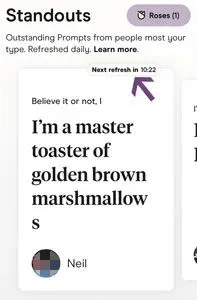
Hinge says you may also see a user in your Discover feed as well, but it’s not guaranteed.
Important note: Standouts aren't the same as the Enhanced Recommendations you get as a HingeX member. Those are also specially curated profiles, but they appear in your Discover feed, not the Standouts section.
#2: Standouts are the most popular users in your area.
Like every dating app, Hinge has an algorithm that pays attention to everything you do.
In the Standouts tab, the algorithm identifies profiles in your area that are “getting the most attention” and then cross references that with the type of content you’ve interacted with in the past. The Hinge algorithm also takes into account that person's swiping patterns.
As Hinge app founder Justin McLeod explained in an interview,
We're really trying to find the people that you're going to like who are also going to like you back and have that equal or greater chance of actually liking you back.
In other words, if you’re seeing someone as a Standout, that means they’re both popular and similar to people you’ve either “liked” or sent a comment to in the past. It also (hopefully) means they're interested in people like you.
#3: Using Standouts is free (sort of).
You can’t “like” a Standout on Hinge, you have to send them a rose.
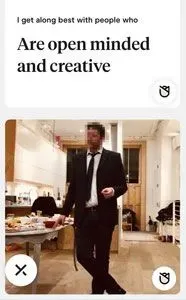
And those are a limited commodity - you only get one free rose every week.
As Chief Product Officer Tim MacGougan told The Verge, charging for Roses intentionally causes scarcity. That means the recipient will recognize the "deep intention" behind sending one.
When you send a rose to a Standout on Hinge, you’ll automatically go to the top of their “likes” list. You can also send a message along with your rose, which can be a great way to get the conversation started on Hinge.
Using Roses On Hinge
Hinge roses are equivalent to a Tinder Super Like or a Bumble SuperSwipe. You have to send one to use the Standouts feature, but you can also send one to any Hinge user who catches your eye in the Discover feed as well.
How To Get Free Roses
All users get 1 weekly Rose that replenishes every Sunday. It never expires, but it doesn't accumulate either. If you don't use your Rose one week, you'll still only have one free Rose come Sunday.
How Much Do Roses Cost?
Apart from your one free Rose, you'll need to purchase them. The Hinge+ (previously called "Hinge Preferred") and HingeX memberships don't include any additional Roses.
Roses cost $3.33 each when you purchase the 3-pack. If you buy more Roses at a time, the individual Rose price drops:
- 3 Roses: $3.33 each
- 12 Roses: $2.49 each
- 50 Roses: $1.49 each

When To Use Your Roses
Since Roses are limited and cost money, use them strategically. Send Roses to Standouts you're genuinely interested in, especially since these profiles may not appear in your regular feed. You can also use them on exceptional profiles in your Discover feed when you want to stand out from other likes.
How To Get On Hinge Standouts
Want to become a Standout yourself? Here's what you need to know.
Standouts Aren't Mutual
Hinge Standouts aren't reciprocal. You won't appear as a Standout in someone's feed just because they appeared as a Standout in yours. That user also won't be notified that you sent them a Rose because they're a Standout—they'll just see that you sent a Rose.
The Algorithm Favors Engagement
To become a Hinge Standout yourself, you need to be one of the most popular profiles in your area. The more users who comment on or "like" your Hinge profile, the higher the odds of the algorithm deeming you Standout-worthy.
And that, of course, takes work. You need compelling photos and intriguing Hinge prompt answers.
Getting Help From Experts
Hiring a team of dating experts to take your Hinge profile to the next level is the easiest way to become a Standout.
Or, you can start with this resource-packed Hinge Guide. You'll find everything you need to make your profile Standout-worthy, including:
- Photo selection strategies that get more likes
- Prompt answer formulas that spark comments
- Profile optimization techniques proven to work
Check it out and start getting the matches you deserve!
Frequently Asked Questions
What are Hinge Standouts?
Hinge Standouts is a special feed featuring curated potential matches—specifically, the most popular users in your area who the algorithm predicts are most likely to match with you. These profiles are selected based on their high engagement rates and similarity to profiles you've previously liked or commented on.

![7 Expert Profile Tips For Hinge [More Messages And Dates!]](/_next/image?url=https%3A%2F%2Fgiving-darling-b92a0458a3.media.strapiapp.com%2FHinge_profile_featured_ca91fcf956.webp&w=3840&q=75)
![HingeX Reviews [2026 Cost & Feature Comparison!]](/_next/image?url=https%3A%2F%2Fgiving-darling-b92a0458a3.media.strapiapp.com%2Fcouple_embracing_on_beach_5e41f4a919.webp&w=3840&q=75)