A Step-By-Step Guide To Delete Tinder And Start Over

Table of contents

How To Start Fresh On Tinder
To delete Tinder, go to Settings > Delete Account > confirm deletion. But here's the catch: if you want to start fresh, you'll need to wait at least 3 months before creating a new account with the same phone number, or use a different phone number and Facebook account immediately. Deleting and quickly recreating your account triggers Tinder's spam detection and can get you shadowbanned—meaning you'll see the app working normally but get zero matches.
Key Insights: How to Delete Tinder Properly
- Shadowban Risk: Immediately recreating your account after deletion can trigger a shadowban where you'll appear active but receive no matches
- Data Retention Period: Tinder keeps your information for 3 months after deletion; using a new phone number and Facebook account is required for clean reset
- Subscription Warning: Deleting your account doesn't automatically cancel premium subscriptions through Apple/Google Play—must be done separately
- Account Reset Timeline: Wait 3+ months between deletion and recreation for best results and to avoid detection by Tinder's algorithms if you want to use the same phone number
- Fresh Start Strategy: When creating a new profile, focus on high-contrast headshots, minimal selfies, and photos showing variety in activities and interests
Editorial Note: Tinder is a registered trademark of Tinder LLC. VIDA Select is not affiliated with, endorsed by, or sponsored by Tinder or Match Group.
Before You Delete: Consider the Risks
Our team of dating experts has logged thousands of hours on all the most popular dating apps. Trust us when we say you'll want to consider a few things before you delete:
Shadowban risk is real. Deleting then immediately recreating your account can get you shadowbanned because Tinder sees it as suspicious behavior—something a bot would do. You'll know you've been shadowbanned because you can use the app normally, but you won't get any matches or messages.
You'll need new credentials for a clean reset. You'll need to create your new Tinder account with a different phone number and Facebook, unless you wait longer than the 3-month data retention period.
You'll lose any remaining subscription time. Any remaining time on your paid subscription to Tinder Plus, Gold or Platinum will be lost.
When Resetting Your Account Is Worth the Risk
There are 2 scenarios where it's conceivably worth resetting your Tinder account:
- You've completely run out of people in your area and you want another shot at matching with them.
- You've totally overhauled your Tinder profile with better photos and a new bio—and you still aren't getting good results. In other words, you're firmly in "What have I got to lose?" territory.
How To Delete Tinder And Start Over
To start completely over on Tinder, follow these steps:
-
Log in to Tinder.
Open the app and navigate to the "Settings" menu.
-
In the "Settings" menu, scroll all the way down to "Delete Account".
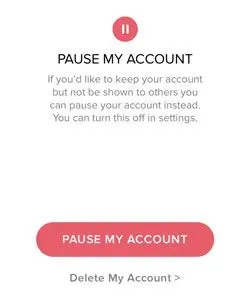
Tap on "Delete Account" then choose whether to Pause or Delete it.
-
Tap "Delete Account"
Then confirm your action. You'll get a notification that your account was deleted successfully.
If you’re a Tinder Plus, Gold or Platinum subscriber using your Apple ID or Google Play Store ID, deleting your Tinder account will not automatically cancel your subscription. You need to unsubscribe via the App Store or Google Play.
But if you subscribed via Android or Tinder.com with a credit card, deleting your account will automatically cancel your subscription.
If you log in via Facebook:
- Properly delete your account according to the instructions above.
- Open your Facebook profile.
- Go to “Settings”, and tap “Apps & Websites”
- Tap “Tinder”
- Tap “Remove App” at the very bottom of the menu selections
- Confirm
- Create a brand new Facebook account, this time using a different email. (If you were a paid subscriber, you’ll also want to use a different Apple ID or Google Play account).
- Install the Tinder app
- Log into Facebook, then open the Tinder app and create a brand new Tinder account
- Provide a new phone number, making sure you’ll have access to it in order to retrieve the SMS codes for verification
If you log in with a cell number:
- Properly delete your account according to the instructions above.
- Reinstall Tinder, keeping in mind that if you were a premium subscriber you’ll need to use a different Apple ID or Google Play account.
- Open the Tinder app, then create your brand new account. You’ll also need a different phone number unless you waited more than 3 months. You’ll need the SMS codes, so make sure you use a phone number you can access as needed.
That’s how to permanently delete Tinder, but it would be good to know…
What happens when you delete your Tinder account?
This effectively deletes your matches, messages, and other account specifics, since you’ll no longer have access to any of it. However, that doesn’t mean all that personal information is immediately erased from existence.
Tinder actually hangs on to that data for another 3 months, according to their privacy policy.
If you’re curious what kind of data Tinder collects on you, you can request a copy of it.
Request your Tinder data following the steps above, and confirm there’s nothing listed from your prior account:
- Start by going to Tinder's "Manage My Account" page.
- Log in to your new Tinder account.
- Enter the email to which you want the data report sent.
- Tinder will send you a link to download your data report, but they don’t specific exactly when - just “in a few days.” Look for it often, because the data link expires 24 hours after they send it.
If you simply want to pause Tinder...
Follow the same steps as above, but this time choose “Pause My Account” when prompted.
You can then reactivate your Tinder account from the “Settings” menu when you’re ready to resume activity. Your profile will not be shown to others while it’s paused.
However, you’ll have to hold off on permanently deleting your account until you download the report.
Now That You’ve Got A Clean Slate…
You need to make the most of your fresh start!
Your pictures are the single biggest factor in your success on the app, so here are 3 Tinder photo tips that will keep those right swipes coming your way!
Start With A Headshot
There’s a reason why hopeful actors and models hand out pictures showing the upper third of their body - i.e. “headshots.” That’s one of the most attractive photo formats. So roll with that as your primary Tinder picture.
For maximum impact, you want your headshot to have these attributes:
#1: A lot of contrast between you and the background. The last thing you want to do on Tinder, or any other dating app, is fade into the surroundings. Command the frame!

#2: It’s visually simple. No anime-inspired filters, no crazy effects - it’s just you. As an image’s complexity goes up, the perceived attraction level goes down. You want to be easy on the eyes, literally.
#3: You’re not hiding your eyes. Anything that obstructs eye contact, be it long hair or a pair of Maui Jim’s, is not doing you a favor. In fact, it’s making you come off as less trustworthy and less likeable - and that’s bad news on Tinder.
Skip The Selfies
Or at least keep them to a minimum in your lineup.
Not only do people want there to be fewer selfies cluttering up social media in general, but studies have shown selfie takers are rated more narcissistic and less attractive & likeable than the same person shown in a normal, non-selfie photo.
Science aside, it’s just plain hard to get the lighting and angles right unless you’ve had a lot of practice. Most selfies on Tinder look awkward and ill-lit, in other words - not flattering.

And here’s one universal selfie don’t - if the setting is your bathroom, or any bathroom for that matter, it has no place in your Tinder lineup. Not hot.
Embrace Variety
It’s the spice of life and all, and it will definitely add some to your Tinder profile. If you want her to “like” your profile, instead of tapping that dreaded “nope” icon, you need to prove what an interesting, multi-faceted guy you are.
In a nutshell, the take-home message your Tinder profile leaves her with should be “interesting guy I want to hang out with.”
Photos of you engaged in a physical activity are especially attractive, since fitness is a big must have for most singles. Hiking trips, biking, sports, kayaking - anything that shows you’re down for a work out are great to include.
Snaps of you interacting with a dog are also particularly effective. Not only does it subtly imply you’re able to take responsibility for the care and feeding of another living being, but owning a dog also ups your attractiveness rating.

And here’s good news if you don’t have a dog - making someone think you do works just as well. Borrow one and have a friend photograph you interacting with it!
Variety also includes colors. Most singles on Tinder choose pics where they’re wearing muted neutral tones, so if you want to stand out include some color. Red is a particularly effective choice, as it makes you even more attractive to women.

Want more tips that will get you off to a great start? Put these Tinder hacks on your reading list!
Start Over On Tinder The Right Way
Deleting Tinder and starting over can be a good move - but only if you do something differently this time around the block.
You’ve just gotten some great Tinder photo tips, but getting better results on Tinder isn’t just about improving your photo lineup - you need to overhaul your bio and hone your messaging skills too.
In other words, you need to do some prep work and get your game up to speed. You need more than just tips, you need an entire Tinder strategy.
It’s work - and it’s why some people compare online dating to a part-time job they never wanted. And here’s the frosting on the cake - Tinder’s been known to both chip away at your self-esteem while simultaneously making you unsatisfied with the matches you do manage to get.
Wish you could skip the stressful depressing part, and fast forward to the “meet incredible singles” part?
With VIDA, you can do exactly that! Our team of dating experts handle all the hard behind-the-scenes part, while you just have to show up for all the amazing dates!
Meeting incredible people on Tinder just got So. Much. Easier.
Frequently Asked Questions
How do I permanently delete my Tinder account?
How do I permanently delete my Tinder account?
Go to Settings in the Tinder app, scroll down to "Delete Account," tap it, then confirm you want to delete (not pause). Your matches and messages will be removed, though Tinder retains your data for 3 months according to their privacy policy.
What happens when you delete Tinder?
What happens when you delete Tinder?
You lose access to all your matches, messages, and profile information. However, Tinder keeps your data for 3 months after deletion. If you subscribed through the App Store or Google Play, your subscription continues unless you cancel it separately.
Can I make a new Tinder after deleting?
Can I make a new Tinder after deleting?
Yes, but proceed carefully. If you create a new account immediately with the same phone number or Facebook, Tinder may flag it as suspicious behavior and shadowban you. Either wait 3+ months to use the same credentials, or create your new account with a different phone number and Facebook account.
What is a Tinder shadowban?
What is a Tinder shadowban?
A shadowban is when Tinder restricts your account without telling you. The app appears to work normally—you can swipe, match, and message—but your profile isn't actually shown to other users, so you get zero matches. This often happens when users delete and quickly recreate accounts.
How long should I wait to make a new Tinder account?
How long should I wait to make a new Tinder account?
Wait at least 3 months if you want to use the same phone number and Facebook account. This is how long Tinder retains your data. If you want to start fresh immediately, you'll need to use a completely different phone number and create a new Facebook account.
Does deleting Tinder cancel my subscription?
Does deleting Tinder cancel my subscription?
Only if you paid with a credit card through Android or Tinder.com. If you subscribed through the Apple App Store or Google Play Store, deleting your Tinder account does NOT cancel your subscription. You must go into your App Store or Google Play settings and cancel separately, or you'll keep getting charged.
Should I delete Tinder and start over?
Should I delete Tinder and start over?
Only in two scenarios: you've completely run out of profiles in your area and want another chance with them, or you've significantly improved your photos and bio but still aren't getting results. If you haven't changed anything about your profile, starting over won't help—and you risk getting shadowbanned.
How do I know if I'm shadowbanned on Tinder?
How do I know if I'm shadowbanned on Tinder?
The main sign is getting zero matches despite regular swiping activity. The app looks and works normally, but your profile isn't being shown to anyone. If you were getting some matches before and suddenly get none after resetting your account, you've likely been shadowbanned.
Can I pause my Tinder instead of deleting it?
Can I pause my Tinder instead of deleting it?
Yes. Follow the same steps to delete, but choose "Pause My Account" instead. Your profile won't be shown to others while paused, and you can reactivate anytime from the Settings menu. This is a better option if you just need a break rather than a complete fresh start.
![10 Best Tinder Openers [Tested By Experts!]](/_next/image?url=https%3A%2F%2Fgiving-darling-b92a0458a3.media.strapiapp.com%2FBest_Tinder_Openers_hero_e43b638008.webp&w=3840&q=75)
![10 Tinder Tricks And Tips [Triple Your Dates!]](/_next/image?url=https%3A%2F%2Fgiving-darling-b92a0458a3.media.strapiapp.com%2Fno_tinder_matches_swear_9a6c14b691.webp&w=3840&q=75)



![A Dating Expert's Guide To Tinder [Get More Matches!]](/_next/image?url=https%3A%2F%2Fgiving-darling-b92a0458a3.media.strapiapp.com%2FTinder_Guide_2022_563b460494.webp&w=3840&q=75)
![Proven Tinder Conversation Starters [Get More Responses!]](/_next/image?url=https%3A%2F%2Fgiving-darling-b92a0458a3.media.strapiapp.com%2Fwoman_on_tinder_app_13fc0707f0.webp&w=3840&q=75)
![Tinder Done For You? [7 Reasons To Outsource Tinder!]](/_next/image?url=https%3A%2F%2Fgiving-darling-b92a0458a3.media.strapiapp.com%2FPay_someone_to_tinder_for_you_6250f30c9f.webp&w=3840&q=75)