How Coffee Meets Bagel Works

Table of contents

Quality Over Quantity—Delivered Daily At Noon
Coffee Meets Bagel sends you a curated batch of compatible matches ("Bagels") every day at noon instead of endless swiping. Women receive profiles of men who already liked them, creating instant matches with one tap. Men get up to 21 suggested Bagels daily. You have 24 hours to like or pass before fresh matches replace them, and once matched, you get 8 days to exchange messages. The app is free to use, though Premium ($35/month) unlocks extras like activity reports and read receipts.
Key Takeaways
- Curated daily matches: CMB sends compatible Bagels at noon—women see men who already liked them, men get up to 21 quality matches. No endless swiping required.
- Serious relationship focus: The 24-hour match window and 8-day messaging limit encourage meaningful connections over casual browsing.
- Free core functionality: Create a profile, receive daily Bagels, and message matches at no cost. Premium features are optional extras.
- Women have more control: Women only see profiles of men who've already shown interest, reducing unwanted messages from incompatible matches.
- Premium costs $35/month: Includes unlimited likes, activity reports showing response times, read receipts, and 8 monthly Flowers to stand out.
- Demographics skew older: Over half of CMB users are 30-49, and women outnumber men roughly 60/40—good odds for men seeking serious relationships.
VIDA's modern dating experts have been using Coffee Meets Bagel since it came on the scene back in 2012. We have hundreds of thousands of hours under our belts, building profiles, curating matches, and sending messages on behalf of our clients.
In a nutshell - we know this popular dating app inside and out, using all the features on a daily basis!
Quick Reference: Coffee Meets Bagel At A Glance
| Feature | Details |
|---|---|
| Daily Bagels | Women: curated matches who liked them / Men: up to 21 |
| Match delivery | Daily at noon |
| Decision window | 24 hours per Bagel |
| Message window | 8 days after matching |
| Cost | Free (Premium: $35/month) |
| User base | 50%+ ages 30-49; 60% women |
| Platform | iOS and Android only (no desktop) |
How Does Coffee Meets Bagel Work?
Similar to Tinder, users on Coffee Meets Bagel “like” or “pass” on profiles based on a handful of photos and a short bio.
But that’s where CMB departs from Tinder’s format.
On Coffee Meets Bagel, women receive a handful of “Bagels” (this app’s term for potential matches) that have been deemed highly compatible by the algorithm in terms of education, interests, similar social network etc. Men also receive a limited number of daily Bagels, however they get up to 21.
The suggested Bagels are delivered daily at noon. Much like actual bagels, they have an expiration date. You only have 24 hours to make a like/pass decision.

At noon the next day, those Bagels are replaced with fresh suggested matches.
Women are presented with profiles of compatible men who have already “liked” them, so tapping “Like” results in an instant match.
A mutual “like” opens the chat room, and you can exchange messages with your match. However, on CMB the messaging window is only open for 8 days. It is possible to access an expired conversation - spending a few Beans will reopen it for another 30 days.
Why Is CMB Different For Men & Women?
The app's founders—sisters Dawoon, Arum, and Soo Kang—designed Coffee Meets Bagel to cater to how women wanted to date:
“This way, women don't waste time on guys who are not serious about them. Women also have control over whom they want to talk to and when.”
Coffee Meets Bagel is phasing out the ability to send a first message along with your "like." Which is too bad, because according to the app’s internal data, including a message increases your chance of matching by 25%:

| PRO TIP: When it comes to sending a Coffee Meets Bagel first message, don’t blow it by sending something boring and lame like “Hey.” Or even worse, asking for her number right off the bat.
Instead, increase your chances of getting a response by asking something fun, light-hearted, and simple to answer. Like this: |

How Does Coffee Meets Bagel’s Algorithm Work?
Like most dating apps, CMB doesn't reveal the specific inner workings of its matching algorithm. However, the founders have said it learns as you use the app, taking into account your specific preferences, who you "like" or "pass," who else is using the app in your area, and whether you're someone else's type.
Suggested vs. Discover: What's The Difference?
| Section | What It Shows | Best For |
|---|---|---|
| Suggested | Daily Bagels identified as highly compatible by CMB's algorithm | Your main matching feed |
| Discover | Profiles of local singles who may or may not match your criteria | Expanding your options |
There are two ways to get more potential matches:
- Purchase additional Bagels by spending Beans
- Browse profiles in the “Discover” section
Coffee Meets Bagel Cost (2026)
You can use Coffee Meets Bagel effectively for free. Creating a profile, receiving daily Bagels, and exchanging messages won't cost you anything. There are also paid memberships that unlock additional features.
Premium Membership Pricing
| Subscription | Total Cost | Per Month |
| 1 month | $35 | $35 |
| 3 months | $75 | $25 |
| 6 months | $120 | $20 |
Premium Features Include:
- Seeing who likes you all at once
- 8 extra "Flowers" in Discover
- Premium matching preferences
- Unlimited “likes” and “passes” in your Suggested feed
- 1 monthly CMB Boost
- Activity Reports on each Bagel
- Read receipts
- Unlimited rewinds
- Bean discounts
CMB Mini (Budget Option)
| Subscription | Total Cost | Per Month |
| 1 month | $14.99 | $14.99 |
| 3 months | $30 | $10 |
| 6 months | $54 | $9 |
Mini excludes seeing who likes you all at once and the 8 extra Discover likes.
What Are Beans?
Beans are CMB's in-app currency, used to unlock features like additional daily Bagels, reopening expired conversations, and sending Flowers.
Bean Pricing
| Package | Price |
| 100 Beans | $1.99 |
| 2,000 Beans | $23.99 |
| 3,000 Beans | $34.99 |
Free Bean Opportunities
You can earn free Beans by completing your profile, following CMB on Instagram, and inviting friends to use the app.
Daily login bonus (first week): New users who log in daily during their first week receive bonus Beans each day—a good incentive to stay active while the algorithm learns your preferences.
What Are Activity Reports?
Activity Reports are a Premium perk—a collection of data about a specific user to help you decide if they're worth pursuing.
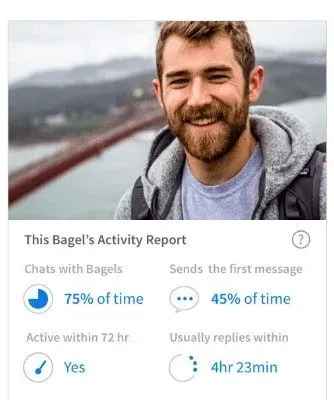
Reports include:
- Chats With Bagels: Number of chats where they sent at least one message, divided by total connections
- Sends First Message: How often they initiate conversations
- Active Within 72 Hours: Whether they've opened the app in the last 3 days
- Usually Replies Within: Their average response time to messages
Each user's data refreshes every 72 hours, populated from their 15 most recent connections.
What Are Flowers?

Flowers let you signal strong interest to a potential match. Your profile will be unblurred for free users and displayed with a virtual bouquet in their Likes You section—guaranteeing you're seen first.
Premium members receive 8 free Flowers monthly, usable in both Discover and Suggested sections.
What's A Priority Like?
Similar to Tinder's "Super Like," a Priority Like signals you're really interested in matching. Each use costs 540 Beans—tap the smaller heart icon instead of the regular "like" to send one.
Priority Like has replaced the former "Send a Woo" feature.

Who Uses Coffee Meets Bagel?
CMB is designed for singles who want to escape endless swiping and take a "slow dating" approach—making meaningful connections and finding serious relationships.
User Demographics
| Age Group | Percentage |
|---|---|
| 18-29 | 36.1% |
| 30-49 | 50%+ |
| 50+ | ~14% |
Gender ratio: Women outnumber men approximately 60/40—favorable odds for men seeking quality matches.
Getting Started: Profile Setup
Once you've downloaded the app (iOS or Android—no desktop version), the setup screens walk you through profile creation:
- Enter your first and last name (last name stays private)
- Provide email, birthday, and gender (currently limited to man or woman)
- Upload up to 9 photos
- Share location and enable notifications
- Set your preferences and complete your bio sections
The Three Bio Sections
Your CMB profile includes three short free-form fields: "I am," "I like," and "I appreciate when my date." Each has a 276-character limit, so focus on your most dateable qualities.
Keep every section positive. Negativity stands out in short dating profiles and can be associated with relationship baggage or inferiority—neither of which attracts quality matches.
Example of what NOT to do:
- "I am... not looking for drama or games"
- "I like... women who actually respond to messages"
- "I appreciate when my date... isn't glued to their phone"
Each of those signals frustration from past dating experiences. Focus on what you want, not what you're trying to avoid.
How To Delete Your Coffee Meets Bagel Account
Important: Deleting your account and the app does NOT cancel your Premium subscription. Cancel subscriptions separately through Apple (iOS) or Google Play Store (Android).
iOS Deletion Steps:
- Open the app → tap "Profile" icon
- Tap "Settings" icon
- Select "Go On Hold" in Account menu → confirm and provide reason
- Return to Settings → scroll to bottom → tap "Delete Account"
- Confirm by tapping "Delete Permanently"
- If using Facebook login, revoke permissions in Facebook Settings/Apps
If you log in via Facebook, you’ll want to revert the permissions in Facebook via the Settings/Apps menu.
Deleting your account and the app does not cancel your Premium subscription. You’ll need to do that via Apple.
Android Deletion Steps:
- Open the app → tap "Profile" icon
- Tap "..." in top right corner → tap "Settings"
- In Account menu, toggle off "Active" → confirm and provide reason
- Return to Settings → scroll to bottom → tap "Delete Account"
- If using Facebook login, revoke permissions in Facebook Settings/Apps
Want An Easy Alternative To Swiping - And Better Dates?
Modern dating isn’t easy, and for many singles it’s an exercise in frustration. Swiping, matching, messaging - all of it eats into your free time, and if you’re not getting the outcome you want, your self esteem can take a hit.
Having a compelling, well-written profile and attractive photos is crucial to get matches on Coffee Meets Bagel - but that’s not exactly a skill you can easily learn, much less implement across all your dating apps and sites.
If you don’t have time for a steep learning curve but you really want to meet high-quality people, VIDA Select was created especially for singles like you.
With VIDA, you’ll have a team of professional writers, photo experts and matchmakers working around the clock to find your ideal partner. From profile creation to messaging, every aspect is handled by an industry expert - so you can just enjoy first dates with incredible, highly compatible singles.
It’s so easy to get started - and you won’t believe how quickly the average client meets someone special. Click here to learn more!
Frequently Asked Questions
Is Coffee Meets Bagel free?
Is Coffee Meets Bagel free?
Yes, the core features are free. You can create a profile, receive daily Bagels, and message matches without paying. Premium ($35/month) and Beans unlock extras like activity reports, read receipts, and additional matches, but they're not required to use the app effectively.
How many matches do you get per day on CMB?
How many matches do you get per day on CMB?
Women receive a curated selection of Bagels (men who already liked them). Men receive up to 21 suggested Bagels daily. Both can browse additional profiles in the Discover section.
Can you use Coffee Meets Bagel without Facebook?
Can you use Coffee Meets Bagel without Facebook?
Yes. You can sign up using your mobile phone number instead of Facebook.
Why do matches expire on Coffee Meets Bagel?
Why do matches expire on Coffee Meets Bagel?
The 24-hour decision window and 8-day messaging limit are intentional design choices to encourage meaningful engagement rather than passive browsing. You can reopen expired conversations by spending Beans.
Is Coffee Meets Bagel good for serious relationships?
Is Coffee Meets Bagel good for serious relationships?
Yes—it's designed specifically for that purpose. The curated daily matches, limited decision windows, and messaging time limits all encourage thoughtful connections over casual swiping. Over half the user base is 30-49, and the 60/40 female-to-male ratio means men have favorable odds.
What's the difference between Suggested and Discover?
What's the difference between Suggested and Discover?
Suggested shows your daily Bagels—highly compatible matches selected by CMB's algorithm. Discover is a broader feed of local singles who may or may not fit your criteria, useful for expanding your options beyond the algorithm's picks.
Are Activity Reports worth getting Premium for?
Are Activity Reports worth getting Premium for?
If you're frustrated by matches who never respond, Activity Reports can save time by showing you who's actually active. Seeing response times and messaging habits helps you prioritize Bagels who are likely to engage.
Is there a desktop version of Coffee Meets Bagel?
Is there a desktop version of Coffee Meets Bagel?
No. Unlike Tinder and Bumble, CMB is mobile-only—available on iOS and Android.
![Best Dating Sites For Professionals [2026 Top List!]](/_next/image?url=https%3A%2F%2Fmedia.vidaselect.com%2Fprofessional_woman_hero_66471e26d3.webp&w=3840&q=75)
![CMB Boost Review [2026 Cost + How It Works!]](/_next/image?url=https%3A%2F%2Fmedia.vidaselect.com%2FCMB_Boost_notification_bfe7841e3f.webp&w=3840&q=75)
![Coffee Meets Bagel Premium Reviews [2026 Cost!]](/_next/image?url=https%3A%2F%2Fmedia.vidaselect.com%2FCMB_review_hero_eb81078be9.webp&w=3840&q=75)
![Coffee Meets Bagel Review [2026 Cost And Features]](/_next/image?url=https%3A%2F%2Fmedia.vidaselect.com%2Fman_and_woman_sitting_huggi_63e9013e46.webp&w=3840&q=75)

![Hinge Or CoffeeMeetsBagel? [Head To Head Comparison!]](/_next/image?url=https%3A%2F%2Fmedia.vidaselect.com%2FHinge_vs_CMB_25_8c1baa63e3.webp&w=3840&q=75)

![The Best Dating Apps For Men [By Age]](/_next/image?url=https%3A%2F%2Fmedia.vidaselect.com%2Fbeach_couple_d7ba2a2229.webp&w=3840&q=75)