Tinder Explore Explained [Plus Expert Tips To Boost Your Match Rate!]

Table of contents

Unlock hidden Tinder Matches With Explore
Tinder Explore is a free feature hub that curates profiles based on shared interests, dating goals, and interactive experiences. Access it by tapping the magnifying glass icon with three boxes in your menu bar. This game-changing tool helps you find more compatible matches by filtering singles into categories like "Pet Parents," "Creatives," and relationship intention groups.
💡 Key Insights
- What Explore is: A free hub within Tinder that organizes profiles based on shared interests, dating goals, and interactive experiences like Vibes and Hot Takes.
- How to access it: Tap the magnifying glass with three boxes icon in the menu bar on both mobile and desktop versions.
- Personalized categories: The tab shows curated feeds based on the interests and lifestyle badges in your profile, such as "Pet Parents," "Creatives," or "Social Causes."
- Dating intention filters: The "My Vibe" section lets you browse singles with specific relationship goals like "Free Tonight," "Coffee Date," or "Looking For Love."
- Photo verification advantage: Access the verified-only feed to avoid fake profiles by completing Tinder's video selfie verification process.
- Match optimization tips: Maximize your distance settings to see more potential matches, add up to 5 interest badges to your profile, and tailor your opening messages around shared category interests.
This short guide explains exactly how this Tinder feature works, plus how you can use it to get more matches!
Editorial Note: Tinder is a registered trademark of Tinder LLC. VIDA Select is not affiliated with, endorsed by, or sponsored by Tinder or Match Group.
What Is Tinder Explore?
Launched in late 2021, Tinder Explore is a hub within the app that houses all the interactive experiences like Vibes, Hot Takes, Festival Mode, Swipe Night and more.
It’s also the place to go when you want to scroll through profiles of users curated around a common interest or dating goal. If you’ve ever wished Tinder offered more of a social media experience, you’ll likely love using Explore.
As Tinder’s CEO Jim Lanzone explained in a press release when the feature first launched, the Explore hub offers “more ways to have fun and interact with others virtually and more control over who they meet on Tinder.”
How Do I Get Tinder Explore?
To open the Explore tab on Tinder, tap the Explore icon in the menu bar. It’s the one with the magnifying glass and three boxes.

You can access Explore from both the mobile app and Tinder Online.
This is a free feature, so you don’t need a Tinder Plus, Gold or Platinum membership to access it.
Welcome To Explore - How The Tinder Hub Works
The Tinder Explore tab essentially acts as a homepage. It’s stocked with different categories of profile feeds Tinder’s algorithm thinks are of special interest to you, based on choices you make within the app.
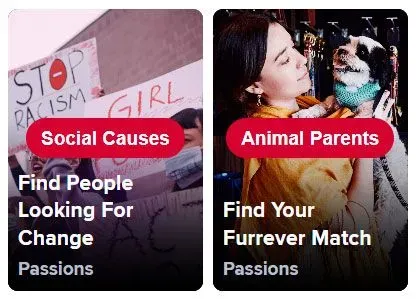
For instance, if you include the Dogs lifestyle badge and the Activism interest badge in your Tinder bio, you may see the “Social Causes” and “Pet Parents” categories on your Explore tab:
Or if your Interest badges include Cafe Hopping and Art Galleries, your hub might include the Creatives and Brunch Time categories:

The Tinder Explore hub also allows you to add relationship goals as another way to find connections with similar interests. You’ve got five categories to choose from: Non-Monogamy, Serious Dater, Short-Term Fun, Long-Term Partner, and New Friends.
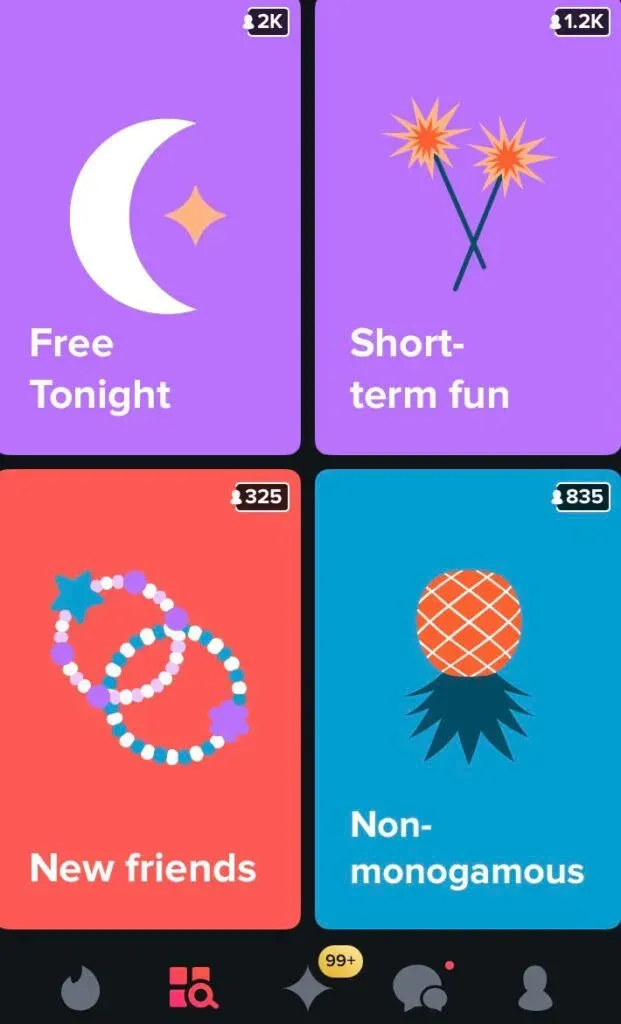
Whether you're looking for commitment, casual dating, friendship, or exploring non-traditional relationships, there's a space tailored to those preferences. The addition of “New Friends” hints at Tinder stepping into the friend-finding space, similar to Bumble BFF, while “Non-Monogamy” highlights the app’s effort to be more inclusive.
In the Tinder Explore My Vibe section, you can join specific groups like Free Tonight, Coffee Date, Let’s Be Friends or Looking For Love.

All the singles you’ll encounter in each group have the same goal, whether that’s finding friends, hooking up, dating casually or finding a committed relationship.
You’ll know you’re browsing the specially curated feed by the label at the top of the screen, and the colored border that surrounds the profiles:

Tinder Explore also displays invitations to join any events or games that are happening (or about to happen) when you log in.
And if you’re tired of encountering fake profiles on Tinder, you’ll be particularly happy about the Photo Verified feed.

To be included in this feed, users must earn the verification badge. To get photo verified on Tinder, tap the “Try Now” button and follow the prompts.

You’ll be asked to record a short video selfie via the app. That footage will be compared to photos in your lineup. If they match, you get the check!
Once you’ve been photo verified on Tinder, you’ll unlock this category in the Tinder Explore hub.
How Do I Use Tinder Explore To Get More Matches?
Here are 3 easy ways to use the Tinder Explore page to connect with more like-minded local singles!
Tip #1: Max Yourself Out
Since the profile feeds in each category are filtered around a specific criterion, you may find yourself running out of potential matches fairly quickly. Especially if you aren’t in a major city.
For the best results, set your distance range to the maximum radius you’re willing to date within. That will help you avoid the ‘Tinder out of users’ screen.

Tip #2: Get Interested
Many of the categories reflect the Interest (or in some markets, Passion) badges you’ve attached to your profile. If you haven’t added any yet, get on it.
How add & change your Tinder badges:
- Tap on the profile icon
- Tap on the edit icon at the top of the screen
- Scroll down to the Interests section
- Tap on the arrow to bring up the menu
- Select up to 5 badges to display
- Tap Done
You can change your badges whenever you want. The good news is you have 175+ options to choose from, so that can be a great way to both instantly refresh your profile and change your Tinder Explore For You homepage experience.
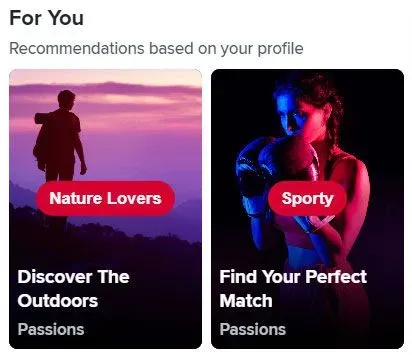
For You is the section where the app will display recommendations based on your profile. You’ll find it right underneath the My Vibe display.
Tip #3: Tailor Your First Message
The various categories make figuring out what to say on Tinder a whole lot easier. You don’t even have to read her profile to know at least one thing you’ve got in common.
And whether you’re using Explore or not, the app helpfully highlights any interest badges that you’ve both displayed. That’s another compelling reason to add a few to your Tinder profile if you haven’t already.
Frame your message around the category you’re scrolling through, and boom - instant icebreaker inspiration. Want some examples of great conversation starters? Check out these proven Tinder openers! You’re sure to find one to fit the occasion.
And if you really want to up your Tinder game and start matching with relationship-quality singles, this Tinder Guide is packed with all the tips, tricks and research-advice you need to make it happen.
Frequently Asked Questions
Is Tinder Explore free to use?
Is Tinder Explore free to use?
Yes, Tinder Explore is completely free. You don't need a Tinder Plus, Gold, or Platinum subscription to access it. Simply tap the magnifying glass icon with three boxes in your menu bar to start exploring.
Where is the Explore tab on Tinder?
Where is the Explore tab on Tinder?
The Explore tab is located in the menu bar at the bottom of your screen. Look for the magnifying glass icon with three boxes. You can access it from both the mobile app and Tinder Online.
How does Tinder Explore choose which categories to show me?
How does Tinder Explore choose which categories to show me?
Tinder Explore uses the Interest and Lifestyle badges you've added to your profile to curate personalized category feeds. The algorithm displays categories it thinks match your interests, like "Pet Parents" if you have the Dogs badge, or "Creatives" if you've selected art-related interests.
What are the My Vibe groups in Tinder Explore?
What are the My Vibe groups in Tinder Explore?
My Vibe groups let you browse singles with specific dating intentions. The five main relationship goal categories are Non-Monogamy, Serious Dater, Short-Term Fun, Long-Term Partner, and New Friends. Within these, you'll find specific groups like "Free Tonight," "Coffee Date," "Let's Be Friends," and "Looking For Love."
How do I get verified on Tinder to access the Photo Verified feed?
How do I get verified on Tinder to access the Photo Verified feed?
To get photo verified, tap the "Try Now" button in the Photo Verified section and follow the prompts. You'll record a short video selfie through the app, which will be compared to your profile photos. If they match, you'll receive the verification badge and unlock access to the verified-only feed.
How many Interest badges can I add to my Tinder profile?
How many Interest badges can I add to my Tinder profile?
You can display up to 5 Interest badges on your Tinder profile at once. Tinder offers 175+ badge options to choose from, and you can change them whenever you want to refresh your profile and update your Explore categories.
Why am I running out of profiles in Tinder Explore?
Why am I running out of profiles in Tinder Explore?
Explore feeds are filtered by specific criteria, so they can show fewer profiles than regular swiping, especially in smaller cities. To see more potential matches, increase your distance range to the maximum radius you're willing to date within.
Can I use Tinder Explore to find friends, not just dates?
Can I use Tinder Explore to find friends, not just dates?
Yes! Tinder Explore includes a "New Friends" relationship goal category and a "Let's Be Friends" group in the My Vibe section. This feature positions Tinder as a friendship platform similar to Bumble BFF.
![10 Best Tinder Openers [Tested By Experts!]](/_next/image?url=https%3A%2F%2Fgiving-darling-b92a0458a3.media.strapiapp.com%2FBest_Tinder_Openers_hero_e43b638008.webp&w=3840&q=75)
![10 Tinder Tricks And Tips [Triple Your Dates!]](/_next/image?url=https%3A%2F%2Fgiving-darling-b92a0458a3.media.strapiapp.com%2Fno_tinder_matches_swear_9a6c14b691.webp&w=3840&q=75)


![A Dating Expert's Guide To Tinder [Get More Matches!]](/_next/image?url=https%3A%2F%2Fgiving-darling-b92a0458a3.media.strapiapp.com%2FTinder_Guide_2022_563b460494.webp&w=3840&q=75)

![Tinder Done For You? [7 Reasons To Outsource Tinder!]](/_next/image?url=https%3A%2F%2Fgiving-darling-b92a0458a3.media.strapiapp.com%2FPay_someone_to_tinder_for_you_6250f30c9f.webp&w=3840&q=75)