How To Get More Dates With Video Prompts On Hinge


How To Use Hinge Video Prompts To Get More Matches
Hinge video prompts let you add a 30-second video to your profile in response to specific prompts like "Let me teach you how to" or "Quick story time." Unlike regular Hinge videos uploaded from your camera roll, video prompts must be recorded in-app with a prompt displayed on screen. They appear separately from your photo lineup and don't replace existing prompt answers. Video prompts help showcase your personality, voice, and mannerisms in ways photos can't.
Table of contents
How To Use Hinge Video Prompts To Get More Matches
Hinge video prompts let you add a 30-second video to your profile in response to specific prompts like "Let me teach you how to" or "Quick story time." Unlike regular Hinge videos uploaded from your camera roll, video prompts must be recorded in-app with a prompt displayed on screen. They appear separately from your photo lineup and don't replace existing prompt answers. Video prompts help showcase your personality, voice, and mannerisms in ways photos can't.
Key Takeaways:
- Hinge video prompts are up to 30 seconds long and must be recorded in-app (not uploaded from camera roll)
- You can choose from video-specific prompts or use any regular Hinge prompt
- Video prompts appear separately and don't replace your existing prompt answers
- More than half of Hinge users say mannerisms are the most intriguing part of watching someone's video
- You can re-record as many times as needed, but previous takes aren't saved
- Video prompts can be muted if you prefer not to include audio
- Strategic prompt selection based on your ideal match increases effectiveness
Our dating experts have managed Hinge on behalf of thousands of clients since it launched back in 2012. This real-world experience gives us unique insight into what works best on Hinge - and what mistakes to avoid.
What Are Hinge Video Prompts?
Hinge video prompts let you record an up-to-30-second video response to a prompt of your choice. The feature gives potential matches a chance to see your personality, hear your voice, and get a sense of your mannerisms before matching.
When Hinge launched the feature, they found that more than half of users considered mannerisms the most intriguing part of watching a potential match's video. Hearing someone's voice and getting a glimpse of their environment also ranked high.
Your video prompt appears separately in your profile and won't replace any of your existing written prompt answers.
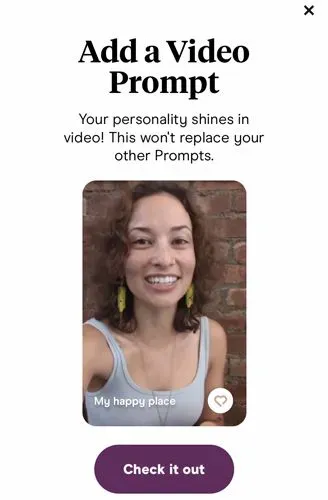
Hinge Video Prompts vs. Regular Hinge Videos
These two features work differently, so it's important to understand the distinction.
Regular Hinge Videos occupy one or more of the 6 spots in your photo lineup. You can upload them from your camera roll, Facebook, or Instagram.
Hinge Video Prompts must be recorded directly in the app. A specific prompt is paired with your video and displays on screen as it plays. They appear in a dedicated section rather than taking up photo slots.
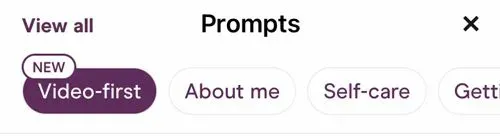
Examples of video-first prompts on Hinge include:
- Let me teach you how to
- My review of
- Things I own that just make sense
- A friend’s review of me
- Put a finger down if
- Quick story time
- Hi from me and my pet
- Can we talk about
- Rate my fit
- I’m a 10 but
- Cook with me
- Something that’s special to me
- A daily essential
You're not limited to these options—you can also use any of the regular Hinge prompts for your video response.
How To Add Hinge Video Prompts To Your Profile
The process is very similar to adding a Hinge voice prompt.
To add a Hinge video prompt to your profile:
- Tap the profile icon
- Tap Edit Profile
- In the Video Prompt section, tap Select a Prompt
- If prompted, grant permission for the app to access both your camera and your microphone
- Tap the prompt on the lower portion of the screen to bring up the menu
- Select the prompt you’d like to use
- Tap the button to begin and stop recording
- Tap Redo if you want to re-record or the purple > if you want to use it
- Make any changes you want via the Edit Video screen
- To mute the audio in your Hinge video, tap the sound icon in the upper left corner
- Tap Done to add the Hinge video prompt to your profile, or tap Replace Video if you want to start over
Your video prompt will now be displayed with the rest of the content in your Hinge profile.
3 Expert Tips for Hinge Video Prompts
Video adds authenticity and personality that photos and text can't match. But like any profile element, it works best with a strategic approach.
#1: Choose With Your Ideal Match in Mind
Think about who you want to attract and select a prompt that showcases relevant qualities or interests.
If your ideal match is adventurous and outdoorsy, record yourself during an outdoor activity rather than sitting in a room talking about it. The next time you're hiking or kayaking, open Hinge and record a video for prompts like "My happy place," "I go crazy for," or "Typical Sunday."
If you want someone who shares your love of books, film yourself at your favorite bookstore or showing off recent reads. Prompts like "I wind down by" or "I geek out on" work well for hobbies.
You have 30 seconds maximum, so focus on one specific interest or hobby you'd like to share with a match.
#2: Show Attractive Qualities Through Subtext
Hinge attracts serious relationship seekers, so traits like loyalty, responsibility, and stability matter. But writing "I'm loyal and responsible" isn't compelling. Video lets you demonstrate these qualities instead.
The "Hi from me and my pet" prompt communicates all three traits—pet ownership requires them. Plus, your adorable dog makes an easy conversation starter.

Not a pet owner? Show off other relationship-ready qualities. Use "Unusual skills" to give a quick tour of a DIY project around your house. Choose "Let me teach you how to" or "Something that's special to me" and record yourself preparing a dish for Sunday family dinner.
The key is planning what qualities you want to convey, then choosing a prompt and setting that demonstrates them naturally.
#3: Be Spontaneous, Not Rehearsed
Your video should feel natural and genuine. Think about what you want to say beforehand, but don't script it word-for-word.
Sounding rehearsed—or worse, like you're reading cue cards—undermines the authenticity that makes video effective in the first place.
Hinge lets you re-record as many times as you want, though it doesn't save previous takes. Your second or third attempt will likely be your best, hitting the sweet spot between prepared and natural.
Want more Hinge video advice? Check out these 7 tips for making your Hinge videos the best they can be!
Frequently Asked Questions
What are Hinge video prompts?
What are Hinge video prompts?
Hinge video prompts let you record up to 30 seconds of video in response to a specific prompt. The prompt displays on screen as your video plays. Unlike regular Hinge videos, video prompts must be recorded in-app rather than uploaded from your camera roll.
How long can Hinge video prompts be?
How long can Hinge video prompts be?
Hinge video prompts can be up to 30 seconds long.
Do Hinge video prompts replace my photos?
Do Hinge video prompts replace my photos?
No. Video prompts appear in a separate section of your profile and don't take up any of your 6 photo slots. They also don't replace your existing written prompt answers.
Can I upload a video from my camera roll as a video prompt?
Can I upload a video from my camera roll as a video prompt?
No. Hinge video prompts must be recorded directly in the app. If you want to use pre-recorded video, you'll need to add it as a regular Hinge video in your photo lineup instead.
Can I re-record my Hinge video prompt?
Can I re-record my Hinge video prompt?
Yes. You can re-record as many times as you want before saving. However, Hinge doesn't save previous takes, so make sure you're happy with a version before recording over it.
Can I mute the audio on my Hinge video prompt?
Can I mute the audio on my Hinge video prompt?
Yes. On the Edit Video screen, tap the sound icon in the upper left corner to mute the audio before saving your video prompt.
What prompts can I use for Hinge video prompts?
What prompts can I use for Hinge video prompts?
You can use any of the video-specific prompts (like "Let me teach you how to," "Quick story time," or "Hi from me and my pet") or any of the regular Hinge prompts.
What's the difference between Hinge videos and Hinge video prompts?
What's the difference between Hinge videos and Hinge video prompts?
Regular Hinge videos are uploaded from your camera roll and occupy spots in your photo lineup. Video prompts must be recorded in-app, display a prompt on screen, and appear in a dedicated section separate from your photos.



![Hinge Conversation Tips For Men [Two Strategies That Work!]](/_next/image?url=https%3A%2F%2Fmedia.vidaselect.com%2Fsharing_donut_0993a23470.webp&w=3840&q=75)

![How To Use Hinge Videos To Get More Dates [7 Expert Tips!]](/_next/image?url=https%3A%2F%2Fmedia.vidaselect.com%2Fwoman_hinge_video_61786e470d.webp&w=3840&q=75)